
How to SEO Your Blog Posts: A Beginner’s Guide That Actually Works
Are you tired of publishing brilliant blog posts that nobody ever finds? You’re not alone.
If you’re running a business and blogging to attract clients, but your posts feel like they’re disappearing into the void, the problem isn’t your expertise or your writing; it’s likely your SEO.
I see this all the time with my clients: talented business owners creating valuable content that should be bringing in leads but instead sits buried on page 10 of Google results.
The good news? You don’t need to become an SEO expert overnight. You just need a simple, proven system that works. Let me walk you through exactly how to optimise your blog posts so they actually get found by the people who need your services most.
Why Your Current Blog Strategy Isn’t Working
Before we dive into the how-to, let’s address the elephant in the room. Most business owners I work with have tried blogging before, but they’re making these common mistakes:
- Writing about what they want to say instead of what their audience is searching for
- Skipping keyword research entirely (or not knowing where to start)
- Publishing posts without any strategic linking or optimisation
- Focusing on being “found by everyone” instead of their ideal clients
Sound familiar? Don’t worry; we’re about to fix all of that.
The 9-Step SEO Blog Process That Gets Results
1. Start with Your Client’s Search Intent (Not Just Keywords)
Before you write anything, ask yourself: “What problem is my ideal client trying to solve when they find this post?”
Your keyword should reflect their actual search behaviour. Instead of targeting “SEO tips,” think about phrases like:
- “how to get my website found on Google?”
- “why isn’t my blog getting traffic?”
- “small business SEO that actually works”
Pro tip: Think like your client, not like an SEO expert. They’re not searching for technical jargon, they’re searching for solutions to real business problems.
2. Craft a Title That Promises Real Results
Your blog title needs to do two things: include your target keyword AND make a clear promise about the outcome. Here’s the formula I use:
[Problem/How-to] + [Specific Audience] + [Clear Benefit/Result]
Examples:
- “How to SEO Your Blog Posts: A Beginner’s Guide That Actually Works”
- “Stop Guessing, Start Ranking: SEO Basics for Small Business Owners”
- “Blog Smarter: 9 Simple SEO Steps to Get Found on Google”
3. Hook Them from the First Paragraph
- Your opening paragraph is make-or-break territory. Here’s what it must include:
- Acknowledge their frustration or challenge
- Use your target keyword naturally
- Promise a clear, actionable solution
- Include an internal link to build trust (link to your about page, services, or another helpful blog post)
4. Structure for Scanners (Because That’s How People Read)
Your ideal clients are busy business owners. They scan before they read. Make it easy for them:
- Use H2 headings that include variations of your keyword
- Keep paragraphs short (2-3 sentences max)
- Add bullet points and numbered lists
- Include subheadings that clearly signal what’s coming next
5. Link Strategically (This Is Where the Magic Happens)
Every blog post should include:
- 2-3 internal links to your key pages (services, about, contact, or other relevant blog posts)
- 1 external link to a high-authority, helpful resource
- Strategic anchor text that tells readers exactly what they’ll find
Why this matters: Internal linking keeps readers on your website longer and helps Google understand your site structure. It’s also how you guide readers toward working with you.
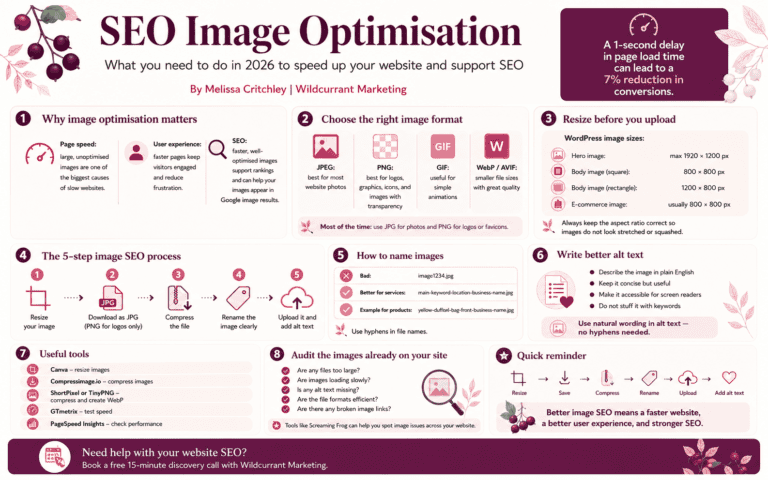
6. Optimise Images Like a Pro
Don’t just upload “IMG_1234.jpg” and call it a day:
- Use descriptive filenames with hyphens: “blog-seo-checklist-small-business.jpg”
- Add alt text that describes the image and includes your keyword when relevant
- Compress images so they don’t slow down your site
7. Write for Humans, Optimise for Google
- Yes, you need to include your keyword throughout the post, but don’t sacrifice readability. Aim for:
- Your keyword in the title, first paragraph, and 2-3 subheadings
- Natural variations throughout the body
- A keyword density that feels conversational, not robotic
Remember: Google rewards content that genuinely helps people, not content that’s stuffed with keywords.
8. End with Purpose (Your CTA Strategy)
This is where most business blogs fail. They write great content, then end with a weak “thanks for reading!”
Instead, always end with:
- A brief summary of what they’ve learned
- A clear next step that serves them AND your business
- Multiple ways to stay connected
For example: “Ready to stop playing guessing games with your website’s SEO? I’ve created a free SEO audit checklist that walks you through exactly what to review on your site. Plus, when you download it, you’ll get my weekly newsletter with more strategies like this delivered straight to your inbox.”
9. The Pre-Publish Checklist
Before you hit publish, run through this quick checklist:
- ✅ Grammar check complete (Grammarly is your friend)
- ✅ All links working and opening correctly
- ✅ Images optimised and displaying properly
- ✅ Meta description written (150-160 characters, includes your keyword)
- ✅ Internal links lead to relevant, helpful pages
- ✅ CTA is clear and compelling
What This Looks Like in Practice
Let me give you a real example. Instead of writing a generic post about “social media tips,” one of my clients wrote “How to Use Instagram Stories to Book More Photography Clients (Even with a Small Following).”
The difference? The second title targets her exact ideal client (photographers) with a specific problem (booking clients) and addresses a common objection (small following). That post now brings her 3-5 qualified leads every month.
That’s the power of strategic, client-focused SEO.
Your Next Steps (Don’t Let This Just Be Information)
Here’s what I want you to do right now:
- Look at your last 3 blog posts – do they target specific client problems or generic topics?
- Choose one post to optimise using the 9 steps above
- Start planning your next post with your ideal client’s search intent in mind
And if you’re thinking, “This makes sense, but I don’t have time to figure this all out myself”—I get it. A Power Hour may be exactly what you need – find out more about Power Hours here
Free guide: why your website has gone quiet
The enquiries that used to come in have slowed, and you can’t quite put your finger on why.
My free guide gives you 5 signs your website has gone quiet, a 5-point SEO check you can run yourself with no tools, and one simple way to see whether ChatGPT and Google’s AI recommend you.
After that, I send short weekly website and SEO tips. Unsubscribe whenever you like.
Sign up below. You can unsubscribe at any time.
Join 500+ small business owners getting the tips.
ABOUT THE AUTHOR | MELISSA CRITCHLEY
With over 20 years in marketing, I founded Wildcurrant Marketing to help small business owners get more from their websites. I build WordPress and Shopify sites with SEO worked in from day one, so your site brings in the right kind of traffic and does some of the selling for you — no constant tinkering required.
Want support?
Book a free 15-minute discovery call and I’ll point you towards the most sensible next step.